Worm with Glasses

Coding • DevOps • Personal

Mar 6, 2026

trueline-mcp v2: Now For Everyone, Not Just Claude Code

Two days ago I announced trueline-mcp, hash-verified, token-efficient file editing for Claude Code.

I’ve been using it to build new features and performance improvements. It works great!

But it only worked with Claude Code, and the MCP protocol doesn’t care which agent is on the other end of the pipe.

So I made it work everywhere.

Five platforms, one tool

trueline-mcp v2.0 supports Gemini CLI, VS Code Copilot, OpenCode, and Codex CLI alongside Claude Code. Same hash-verified edits, same token savings, regardless of which agent you’re running.

The hook system got a complete refactoring to make this possible. Platform-specific logic (tool names, response shapes, event naming) is isolated into thin wrappers around a shared core. A universal CLI dispatcher normalizes everything:

trueline-hook <platform> <event>

Gemini calls its pre-tool event beforetool. Claude Code calls it pretooluse. The dispatcher routes both to the same verification logic.

Each platform gets its own instruction file tuned to that agent’s built-in tool names. The read_filetrueline_read redirect that makes sense for Gemini CLI would be nonsensical for Claude Code’s Read tool. These details matter when you’re intercepting tool calls.

You can also install it from npm now:

npm install -g trueline-mcp

trueline_outline: skip reading entirely!

v1.1 added a fourth tool: trueline_outline. It uses tree-sitter (via WASM) to extract the structural skeleton of a file (functions, classes, types, interfaces) without reading the source. Think of it as a table of contents.

For navigation and understanding, that’s usually enough. The agent doesn’t need to read 400 lines of a file to find the function it wants to edit. It outlines the file, identifies the 15-line range, reads just those lines, and edits. That’s a ~95% token reduction on the read side for the common case.

Supported languages: TypeScript, JavaScript, Python, Rust, Go, Java, C, C++, C#, Ruby, Swift, and more.

Smarter hook, less friction

The PreToolUse hook that blocks the built-in Edit tool used to be a blunt instrument. It blocked every edit attempt and redirected to trueline. Problem is, trueline can’t access every file. If a file is outside the allowed directories or matches a deny pattern, the block just caused a confusing failure.

Now the hook checks whether trueline actually has access to the target file before blocking. If it doesn’t, the built-in tool is allowed through. Same security boundary, fewer dead ends.

Performance

Two targeted optimizations in the hot paths:

Read path — Pre-computed a static lookup table for hash encoding (replacing per-line String.fromCharCode calls) and switched to buffer-based output assembly. Lines stay as raw Buffer bytes through the loop with a single decode at the end.

Edit path — Pass-through lines (the vast majority in any edit) were being hashed twice: once for checksum verification, once for the output file. Now they reuse the first hash.

The diff engine also got replaced. The old diff npm dependency compared two full file snapshots in memory. The new DiffCollector builds unified diffs incrementally during the streaming edit pass. One fewer dependency, no full-file buffering.

Install

If you’re on Claude Code and already have trueline installed, update to the latest:

/plugin install trueline-mcp@trueline-mcp

If you’re new, or on a different platform, setup instructions for all five platforms are in INSTALL.md.

The core is solid. The edit verification, streaming architecture, and token savings work the same across all platforms now. If you’re burning tokens on string-matched edits, give it a shot.

Mar 4, 2026

Claude Code's Edit Tool Wastes Your Most Expensive Tokens. Here's a Fix.

You’re deep into a Claude Code session. The agent is humming along, editing files, and making progress.

And quietly bleeding money on every single edit.

Here’s why. The built-in Edit tool uses string matching. To change five lines of code, the model has to echo back those exact five lines as old_string, then provide the replacement as new_string. That echoed text is pure overhead: it’s already in the file. The model is spending output tokens, the most expensive token class, just to point at code and say “I mean this part.”

For a typical 15-line edit, that’s ~200 wasted output tokens. Do a few dozen edits in a session (not unusual for any real feature work) and you’re burning serious money on text the model already knows is there.

It gets worse when something goes wrong. If the file changed since the agent last read it (maybe you saved in your editor, maybe another tool touched it) the string match fails. The model hallucinating a character or two has the same effect. Either way, the edit errors out, the agent re-reads the whole file to get back in sync, and you’ve just paid for all that content again. In longer sessions, these re-reads compound.

I got tired of watching this happen, so I built trueline-mcp to fix both problems.

The token tax on every edit

Let’s look at what’s actually happening. Here’s the built-in Edit under the hood. The model has to echo the old text just to locate the change:

{
  "file_path": "src/server.ts",
  "old_string": "export function handleRequest(req: Request) {\n  const body = await req.json();\n  validate(body);\n  return process(body);\n}",
  "new_string": "export function handleRequest(req: Request) {\n  const body = await req.json();\n  const parsed = schema.parse(body);\n  return process(parsed);\n}"
}

See all that duplicated text? trueline replaces it with a compact line-range reference:

{
  "file_path": "src/server.ts",
  "edits": [{
    "checksum": "1-50:a3b1c2d4",
    "range": "12:kf..16:qz",
    "content": "export function handleRequest(req: Request) {\n  const body = await req.json();\n  const parsed = schema.parse(body);\n  return process(parsed);\n}"
  }]
}

The model never echoes the old text. It says which lines to replace, proves it read them correctly, and provides the new content. ~200 fewer output tokens per edit, on the most expensive token class.

Oh, and there’s a fun gotcha with the built-in tool: if old_string appears more than once in the file, the edit fails. The model has to pad in extra context lines until the match is unique. Yet more wasted tokens. trueline addresses lines directly. No ambiguity, no padding.

Every edit is verified against reality

The same mechanism that saves tokens is what makes edits reliable. When the agent reads a file through trueline, every line comes back tagged with a short hash:

1:bx|import { Server } from "@modelcontextprotocol/sdk/server/index.js";
2:dd|
3:ew|const server = new Server({ name: "trueline-mcp", version: "0.1.0" });

checksum: 1-3:8a64a3f7

When the agent wants to edit, it echoes those hashes back. If the file changed since the read the hashes won’t match and the edit is rejected before it touches disk. No silent corruption, no guessing, no “why does this file look wrong?” twenty minutes later.

This is the part that kills the re-read cycle. Instead of the agent discovering a stale match, failing, re-reading the whole file, and trying again, trueline catches the mismatch immediately and tells the agent exactly what’s wrong. One targeted re-read of the changed range, and it’s back on track.

Multiple edits to the same file go through in a single call too, each independently verified. The built-in Edit handles one replacement per call, so trueline cuts tool-call overhead for multi-site changes.

Three tools, zero config

  • trueline_read — reads a file, tags each line with a hash, returns a range checksum.
  • trueline_edit — verifies hashes, then applies the edit atomically. Supports multiple edits per call.
  • trueline_diff — same verification, but outputs a unified diff without touching disk. Good for previewing changes before committing to them.

Once installed, a SessionStart hook nudges the agent toward the trueline tools, and a PreToolUse hook blocks the built-in Edit tool so it can’t fall back to string matching. You don’t have to think about it—the agent uses verified edits from the start, automatically.

Security-wise, trueline enforces the same deny patterns Claude Code uses (.env, *.key, etc.)

Try it

/plugin marketplace add rjkaes/trueline-mcp
/plugin install trueline-mcp@trueline-mcp

Two commands. Your next Claude Code session will use hash-verified edits automatically. No configuration, no changes to your workflow. Fewer wasted tokens and edits that don’t silently corrupt your code.

Prior art

Can Boluk described the underlying problem (AI agents working against stale state) and Seth Livingston built a hash-line edit tool for VS Code. trueline brings the same idea to Claude Code as an MCP plugin.

The code is on GitHub: rjkaes/trueline-mcp. Apache-2.0, TypeScript, built with Bun.
Oct 29, 2025

The Biggest Lie in AI

Carl from The Internet of Bugs made a great video about The Biggest Lie in A.I.

A.I. companies repeat the claim that “this is the worst A.I. will ever be” and that’s simply not true. As Carl notes in the video, with the release of ChatGPT-5, it’s clear that it’s not an across the board improvement over ChatGPT-4.5.

Hardware tends to improve over time: gets faster, does more in parallel.

But LLMs are software, and software doesn’t have that track record.

As the old saying goes: “Grove giveth and Gates taketh away.”

May 4, 2023

Yggdrasil VPN

I’m trying to work outside my home office more, but all my email is hosted on my home server. While disconnecting is nice, not having access when I need it has sucked.

Enter yggdrasil!

After installing on my laptop (MacOS) and my desktop (Ubuntu) I updated .ssh/config with my desktop’s IPv6 address and was able to SSH via IPv6 over my local network. Perfect!

Step two: install on a server with a public IP. One more service running on my Digital Ocean instance.

I’m not interested, at the moment, with joining the full yggdrasil network, so I configured my public instance to only allow peering from my laptop and desktop’s public keys:

  AllowedPublicKeys: [
    "desktop-public-key"
    "laptop-public-key"
  ]

On the public server, I listen via TLS rather than plain TCP. It’s slightly slower, but also slightly more secure. Since I’m not moving a lot of traffic over the connection, the extra security is worth it to me:

  Listen: [
                  tls://PUBLIC-IP-ADDRESS:56603
  ]

I couldn’t find a recommended port to listen on, so I picked a random number. 🤣

(The only “gotcha” was remembering to open the firewall for yggdrasil.)

Ramces Red’s article about yggdrasil has more information about installing and configuring a basic VPN.

Mar 6, 2023

How Business Speak Destroys Language

I’m far from the first person to decry how “business speak” destroys our ability to communicate. However, yesterday I read a blog post where “business speak” rendered–genuinely insightful–information less readable:

Even if a project fails before any go-to-market attempt, you can still get learnings out of the experience: You might have picked up some new technology or at least understood somewhat better the inner workings of the organization you work for.

What will be important is to make some effort to capture these learnings lest this value is lost.

(Emphasis added.)

Learnings?

Do people talk like this in real life?

Learnings might be old, but its above usage is decidedly modern and “buzzwordy”.

Why repurpose a word that conveys less information when we have existing strong nouns and verbs?

How about:

Even if a project fails before any go-to-market attempt, you can still learn from the experience: You might have picked up some new technology or at least understood somewhat better the inner workings of the organization you work for.

What will be important is to make some effort to capture this knowledge lest this value is lost.

I won’t nitpick the rest of the sentences: those two changes already improve clarity.

Jan 31, 2023

📚 Searching for Bobby Fischer

Fred Waitzkin was smitten with chess during the historic Fischer-Spassky championship in 1972. When Fisher disappeared from public view, Waitzkin’s interest waned—until his own son Josh emerged as a chess prodigy.

In the past month, I decided to get back into chess, so when I stumbled across “Searching for Bobby Fischer” browsing my library’s collection, I had to check it out. I had heard the title as a kid, but that was the extent of my knowledge.

(As an aside, I didn’t expect the amount of cold war discussion! Much has changed in 40 years, and yet much still remains the same.)

The story’s core is Josh and his chess training and competitions. I saw reflections of my childhood: my passion was computers. I spent hours pouring over obscure manuals and typing programs in from magazines. This was at a time long before computers or programmers were “cool”. Controlling the blinking cursor on our TV captivated my imagination.

Computers also fascinated my father. It was our shared interest (like chess for Fred and Josh.) And like Josh, I soon outpaced my dad.

But that’s where the similarity ends. There were no computing competitions. There were no computing clubs. No public computer centres to practice at. Mine was a private passion that I pursued for my own pleasure.

I think that difference meant Dad and I could continue our interest for decades without outside forces interfering. I’m glad that Josh and Fred appear to have a healthy relationship. Josh did and saw amazing things, but as a parent, I’m not sure the years of stress and tension were worth the lost childhood possibilities.

Throwing around the word “prodigy” is a curse. It sets kids up for failure. Let them find their passion, encourage it as best you can, but don’t place your expectations upon them.

Check out this book for the cold war chess politics, the father-son dynamics, and the world of competitive children’s chess.

Jan 30, 2023

Lazy Loading Neovim Plugins

A couple of weeks ago I decided to redo my Neovim configuration and lean into Lua. The goal was to optimize startup performance and improve usability.

Follow along with my neovim dotfiles repo

For years, I used Plug to manage my vim plugins, but after seeing TJ DeVries experiment with lazy.nvim, I decided to go all in!

By far, the biggest challenge was learning Lua 5.1. All the scripting languages I’ve used in the past (Ruby, Perl, Python) emphasize a “batteries included” approach. Lua, in contrast, felt like I had to assemble everything from tiny parts.

Once I got past the Lua hurdle, the rest of the conversion was straightforward. Most of the time I could swap out Vimscript with neovim Lua API methods via a regexp.

I’m pleased with the results. Startup time is faster, there are fewer weird bugs, and I understand all the configurations.

Jan 28, 2023

📚 Algorithms to Live By

What should we do, or leave undone, in a day or a lifetime? How much messiness should we accept? What balance of the new and familiar is the most fulfilling? These may seem like uniquely human quandaries, but they are not. Computers, like us, confront limited space and time, so computer scientists have been grappling with similar problems for decades. And the solutions they’ve found have much to teach us.

Fascinating book on how the problems of computer science apply to “real life.”

I know about time/space trade-off with computers, but never considered how this can also apply to life. Or how some problems are wicked problems.

Whether you’re a computer science expert or not, the ideas presented will change how you view potential decisions.

Jan 8, 2023

Function Key Snipping with Raycast

Max Gorin posted You’re using function keys wrong where he describes using function keys as a quick launcher!

So, here’s the trick: assign each of your top-12 most used apps to an F-key.

Max uses KeyboardMaestro to show/hide the apps, but we can do the same with Raycast (which I already use, and it’s free.)

Step 1

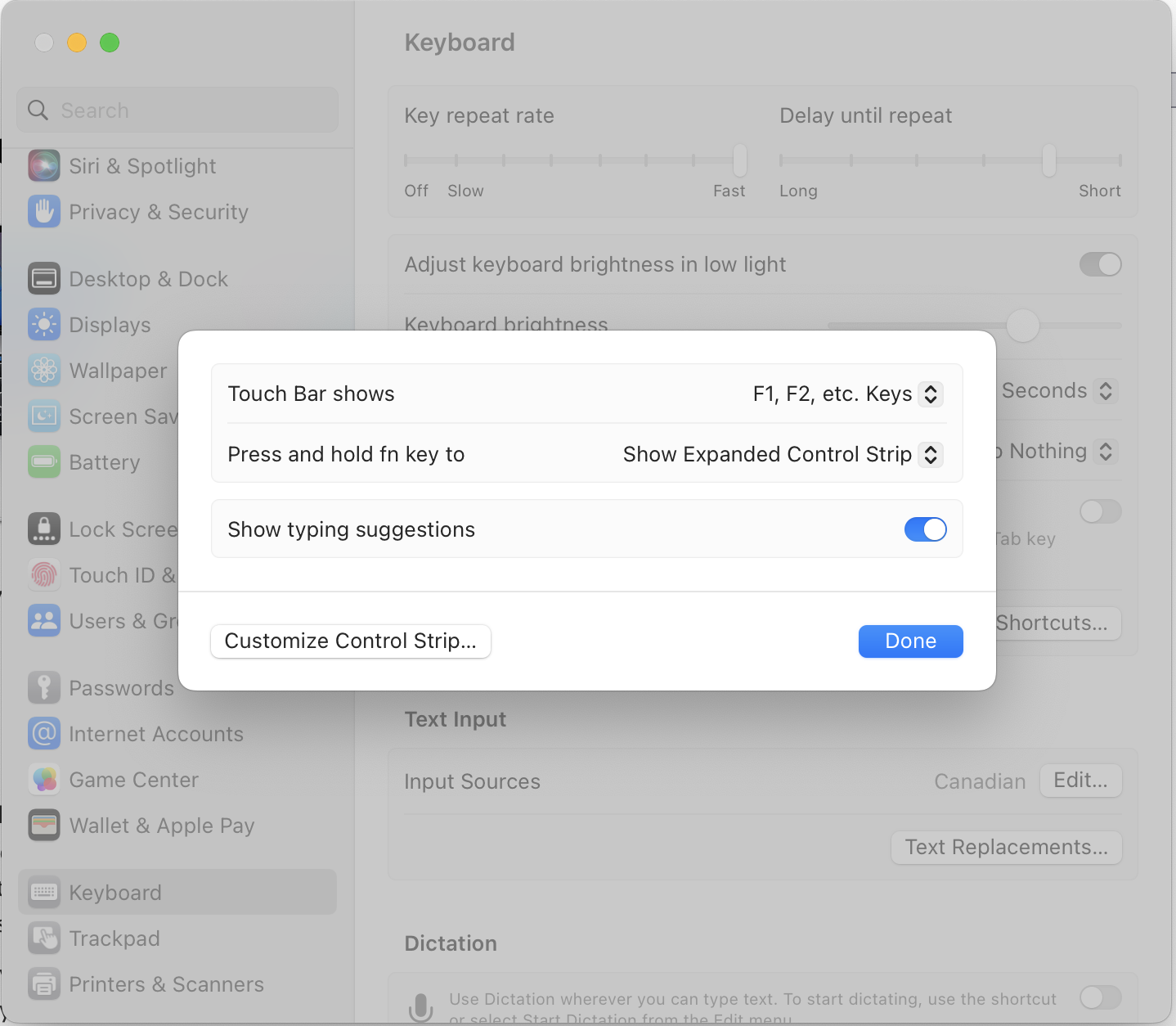
I have a 2019 MacBook Pro with Touchbar so the first change is to always display the function keys.

Within System Settings/Keyboard and Touch Bar Settings change:

  • Touch Bar Shows to “F1, F2, etc. Keys”
  • Press and hold fn key to “Show Expanded Control Strip”
Screenshot of macOS Touch Bar Preferences

Step 2

Install Raycast

Step 3

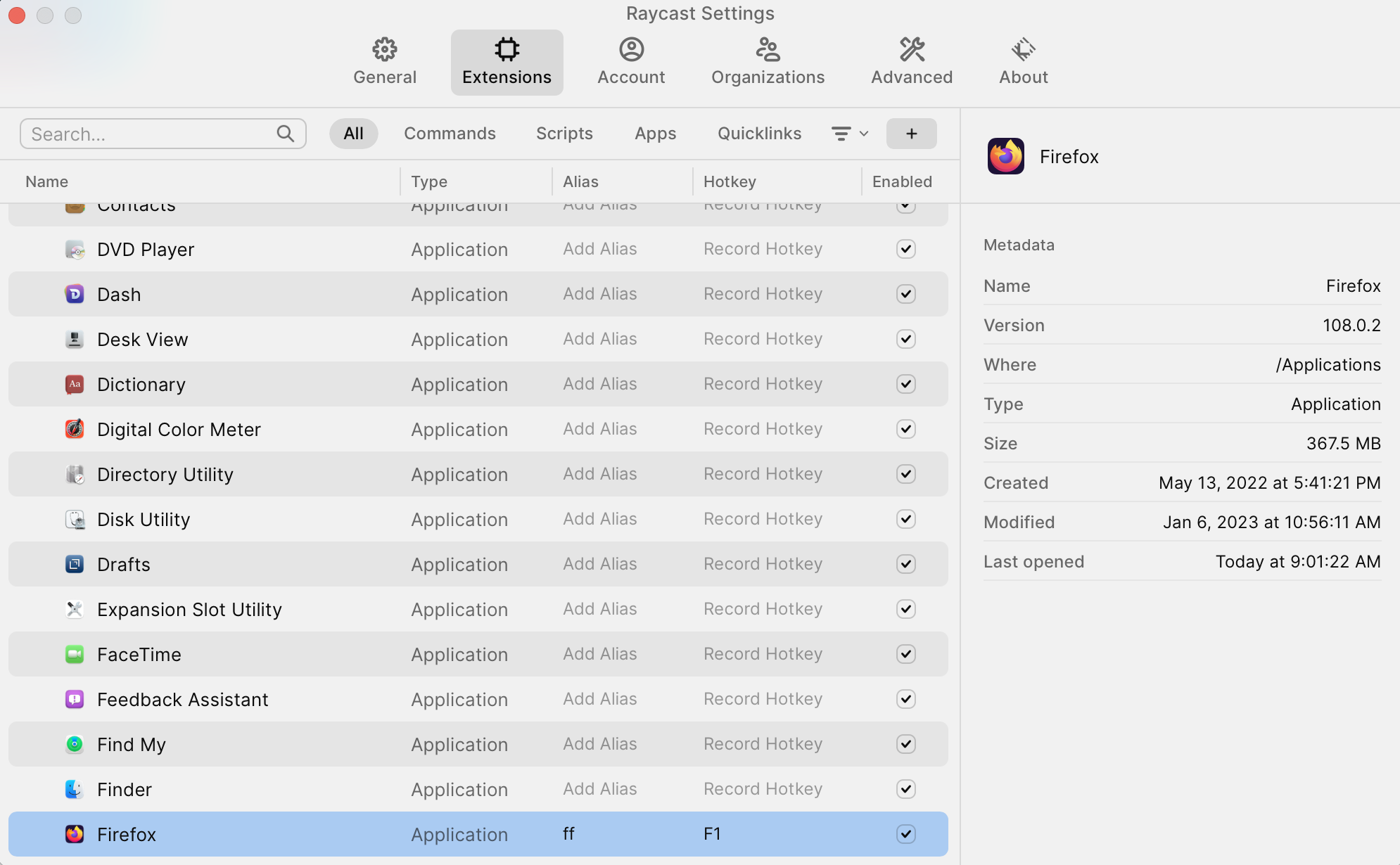
Open Raycast (I use ⌘Space), find the application you want to assign to a function key, and go into application configuration (using ⌘⇧,)

Raycast Application Settings Screen

Hit Record Hotkey and assign it to whatever Fn you want!

For example:

Jan 5, 2023

New Year, New Look

With a new year, it’s time for a new look! Over time, I found the old design too busy. I didn’t have a good idea for a new theme until I happened across Thomas A Caswell’s site. Drawn in by the clean design (inspired by Blue Penguin), I created a new Hugo theme!

I had to make some changes to preserve existing links from the old theme and to maintain the banner images on a smattering of posts.

No Javascript and a lot less markup and CSS.

And if I ever want to switch back, it’s a config.yaml away!

Next → Page 1 of 10